- COMPUTER WORLD: "Following Raspberry Pi 2, Qualcomm's Dev Board Also Supports Windows 10"
- MyNavi News: "Windows 10 to Support Qualcomm's Compact Board 'DragonBoard 410c'"
It packs onboard WiFi, Bluetooth, and even GPS. The CPU is a 64-bit ARMv8. And Microsoft officially announced Windows 10 support for it — hard not to get excited about this one.
Plenty of news sites cover the specs in detail, so I'll skip that and just write down what caught my eye looking at the board photos.
Connector Layout
When it comes to ARM-based Linux evaluation boards in roughly the same size class as the DragonBoard 410c, Raspberry Pi and BeagleBone Black are the obvious comparisons.
Let's look at the latest model of each. Images borrowed from their respective official sites.
The first thing I want to look at is how the external connectors are arranged.
Look closely and you can see that each board reflects a clearly different target user and intended use case.
- DragonBoard 410c
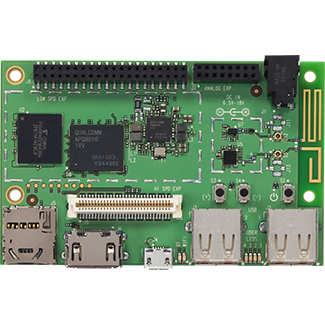
All connectors are grouped along one long edge of the rectangular board.
At this board size, the physical length of USB and HDMI connectors starts to matter.
Clustering them on one side keeps the overall footprint compact even when multiple peripherals are connected.
The dual USB layout is also worth noting. There's plenty of empty space on the board, so a stacked (two-tier) USB connector would have saved room — but they went with side-by-side single connectors instead.
Stacked connectors add height, which can prevent the board from fitting in tight spaces or prevent shields from sitting flush.
It reads like a deliberate choice: prioritise thinness over compactness.
My guess is the board was designed with real deployment scenarios in mind — tucked into a rack, mounted between other equipment.
This isn't just an evaluation board; you can sense Qualcomm taking commercial deployment seriously. - Raspberry Pi 2 Model B
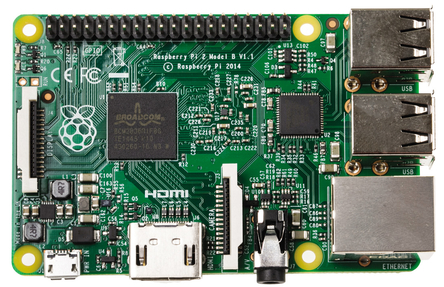
In contrast to the DragonBoard, connectors and the SD card slot are scattered around the edges.
It also sports a generous four USB ports in a stacked side-by-side arrangement.
Cable up every port and it gets bulky fast, and the stacked USB adds height too.
Switching from an AC adapter to micro USB power also tells you something: this board is squarely aimed at hobbyists.
Judging by how well it sells, that strategy is clearly working.
On the flip side, micro USB power in a production setting is a stretch, and four USB outputs on a micro USB power budget is asking for current problems.
If someone tells you they're deploying Raspberry Pi 2 for "IoT" in a 24/7 environment, it's probably fine to smile and nod. - BeagleBone Black
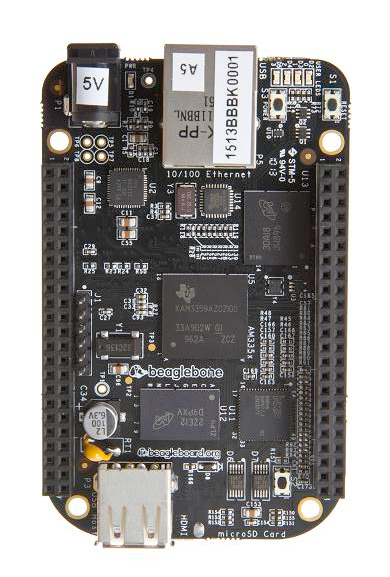
I don't own a BeagleBone Black, but I've always liked its form factor.
Power and LAN on one short edge; one USB and HDMI on the opposite end.
The whole design seems to assume a long, narrow cable bundle once everything is connected.
Connectors on both faces of the board, and header pin placement designed for stacked expansion shields — the entire board optimises for narrow width at the expense of thickness.
The result is the longest and narrowest board of the three. My theory: it was designed to mount on a rack column or similar narrow surface.
What's also clever is having power and LAN on the same end.
In a real deployment, power and LAN cables stay put — but HDMI and USB get plugged and unplugged, and whatever's on those ends tends to have a box or housing around it.
Picture the power and LAN cables dropping down from above, the BeagleBone Black mounted partway, and external devices hanging off the bottom as needed.
Whoever designed this board clearly had that mental image while laying it out. Impressive.


Pin Headers
A bit of a tangent, but the pin headers don't get much coverage in the news, so let's take a quick look.
- DragonBoard 410c
Looking at the specs on the official site, the 60-pin connector appears to be a high-speed interface with an internal USB port — something neither the Raspberry Pi nor BeagleBone Black offers.
When streaming sensor data over a network, SD card I/O can become a bottleneck in buffering-heavy scenarios.
Being able to attach a PC-class SSD via the internal USB connector would give you a compact, fanless, high-capacity storage option.
There's also a mezzanine connector (the white connector in the photo). Apparently attaching an expansion board to it makes the DragonBoard Arduino-compatible — though exactly what that means in practice is a mystery. Can it use Arduino shields? - Raspberry Pi 2 Model B
The only board of the three using male header pins. Seems like nobody considered the risk of bent pins from snagging cables or shorts from dust in a deployed environment.
Maybe they figured male pins are handy for attaching clips? Either way, the hobbyist-first mentality is admirably consistent. - BeagleBone Black
Designed to accept shields, Arduino-style.
Shields look clean, but they end up being product-specific — limited options, and practically worthless once you move on.
In the long run, only Arduino-compatible shields seem to have staying power in this market.
Poor thing.
So, judging by their board designs alone, here's what each one says about itself:
- DragonBoard 410c → High-spec, feature-rich board designed for real-world deployment
- Raspberry Pi 2 Model B → Hobbyist through and through. Production use? What's that? Is it edible?
- BeagleBone Black → Long and narrow. Longer. Narrower. We have shields. Want one? No? Fine.
PCB design really is fascinating.
Goodbye, goodbye.

No comments:
Post a Comment