A classic kids' craft workshop staple, but here we go...
Stick a vibration motor on an old toothbrush and make a bug robot.
It comes together in no time, yet somehow never fails to impress.
Perfect for reclaiming your dignity as a dad.
Here's what the finished product looks like:
Showing posts with label その他. Show all posts
Showing posts with label その他. Show all posts
Thursday, November 23, 2017

Thursday, January 19, 2017
Online Micropayment Services for Individuals: A Comparison
I've been researching ways to sell things online at around ¥500 each, on a short-term and sporadic basis. I don't mind some manual work for customer management, but the biggest hurdle is always payment processing.
Bank transfers are the most reliable, but fees and payment confirmation are a real pain.
I looked into several payment options, so here's a summary for future reference.
Here's the use case I have in mind:
Bank transfers are the most reliable, but fees and payment confirmation are a real pain.
I looked into several payment options, so here's a summary for future reference.
Prerequisites
Here's the use case I have in mind:
- Unit price around ¥500, max ¥1,000.
- A limited-time shop, open for about a month, once or twice a year.
- Expected sales volume: a few dozen to at most 500 units.
- Even if it's just a few dozen per month, manually confirming each transfer is not feasible.
- At ¥500/unit × a few dozen units, revenue will be at most a few tens of thousands of yen.
- No system development — I'll be using someone else's web platform, so just a blog or Facebook page.
- Buyers aren't particularly tech-savvy — just regular smartphone users on LINE and Facebook.
Sunday, September 11, 2016
Things I Want to Try: DD-WRT, Romo SDK, OpenMVS, Reflow Oven
Notes on interesting things I haven't gotten around to trying yet — a personal reference for whenever the mood strikes.
http://www.dd-wrt.com/site/support/router-database
"Flashing a Buffalo WHR-300HP2 to DD-WRT"
http://eco.senritu.net/buffalo_whr-300hp2_dd-wrt/
An open-source router firmware that unlocks extra features on cheap off-the-shelf wireless routers.
VPN, Wake-on-LAN, and more. Linux-based, so you can even SSH into the router.
That said, with embedded CPUs and no storage, SSH access probably just lets you edit routing config by hand — and not much else.
My wireless router (Buffalo WHR-AMG54) recently gave up after 7–8 years of service, so I figure I'll try modding the old one when I get a chance.
Side note: flashing a router firmware in Japan and running it at full wireless power may technically run afoul of technical certification (技適) regulations. You'd probably need to use it as a wired router only. Or maybe not. (Hmm?)
DD-WRT
http://www.dd-wrt.com/site/support/router-database
"Flashing a Buffalo WHR-300HP2 to DD-WRT"
http://eco.senritu.net/buffalo_whr-300hp2_dd-wrt/
An open-source router firmware that unlocks extra features on cheap off-the-shelf wireless routers.
VPN, Wake-on-LAN, and more. Linux-based, so you can even SSH into the router.
That said, with embedded CPUs and no storage, SSH access probably just lets you edit routing config by hand — and not much else.
My wireless router (Buffalo WHR-AMG54) recently gave up after 7–8 years of service, so I figure I'll try modding the old one when I get a chance.
Side note: flashing a router firmware in Japan and running it at full wireless power may technically run afoul of technical certification (技適) regulations. You'd probably need to use it as a wired router only. Or maybe not. (Hmm?)
Monday, January 4, 2016
Making a Font from My Daughter's Handwriting
Whether this counts as "making" something is debatable, but...
My daughter, almost 5, apparently learned all the hiragana syllabary by watching her older sibling — so I went full proud-parent mode and turned her handwriting into a font.
You can create TTF or OTF fonts at PaintFont.com:
http://www.paintfont.com
Click "Create and download templates" on PaintFont.com.
I tried selecting "Japanese", but asking a kindergartner to write every kanji as well is clearly impossible — so I hit "Remove All characters" to clear the slate.
Then in "Enter Additional characters" I typed all the hiragana syllabary and clicked "Add characters".
Don't forget the small kana (っ, ょ, etc.), voiced marks (dakuten), and semi-voiced marks (handakuten).
If you're feeling ambitious, add numbers, punctuation, and symbols too.
PNG is the recommended output format.
My daughter, almost 5, apparently learned all the hiragana syllabary by watching her older sibling — so I went full proud-parent mode and turned her handwriting into a font.
You can create TTF or OTF fonts at PaintFont.com:
http://www.paintfont.com
Download the template
Click "Create and download templates" on PaintFont.com.
I tried selecting "Japanese", but asking a kindergartner to write every kanji as well is clearly impossible — so I hit "Remove All characters" to clear the slate.
Then in "Enter Additional characters" I typed all the hiragana syllabary and clicked "Add characters".
Don't forget the small kana (っ, ょ, etc.), voiced marks (dakuten), and semi-voiced marks (handakuten).
If you're feeling ambitious, add numbers, punctuation, and symbols too.
PNG is the recommended output format.
Getting her to write them
Tuesday, August 4, 2015
Customizing the Maker Faire Tokyo 2015 Makey-kun with koshian
I'm genuinely unsure how many people will ever hit this exact problem, but I was mildly stuck so here's a note.
I didn't make any of this myself.
At the Maker Faire Tokyo 2015 soldering experience corner, you could build a little creature called "Makey-kun". Attach the separately sold koshian module and you can control its LED eyes. That's what it says — but nowhere does it explain how to actually do that.
Update (August 4):
Macnica has added an official explanation page.
Good kids should check the official site.
The koshian manual tells you koshian's specs, but without knowing Makey-kun's specs you can't do much with that.
After digging around I finally figured it out, so I'm writing it down here.
Check on Amazon
Honestly, I wasn't sure either. Apparently it's a Bluetooth module. Despite half-pitch spacing it can fit in a breadboard. Supports GPIO, UART, and similar interfaces. It's a Cortex-M3 SiP module that can be controlled via JavaScript and even have its firmware rewritten. …wait, what? That's pretty impressive.
There's also a related product called konashi — koshian with a battery holder and pin sockets attached.
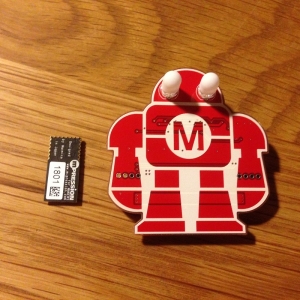
Left: koshian. Right: Makey-kun. Makey-kun's eyes are standard full-color LEDs. The koshian is terrifyingly small.
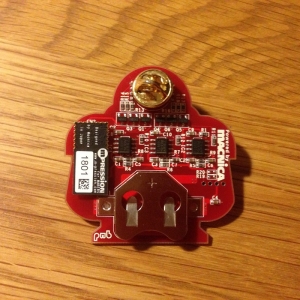
Plug it into the connector on the back of Makey-kun. Done.
At the Maker Faire Tokyo 2015 soldering experience corner, you could build a little creature called "Makey-kun". Attach the separately sold koshian module and you can control its LED eyes. That's what it says — but nowhere does it explain how to actually do that.
Update (August 4):
Macnica has added an official explanation page.
Good kids should check the official site.
The koshian manual tells you koshian's specs, but without knowing Makey-kun's specs you can't do much with that.
After digging around I finally figured it out, so I'm writing it down here.
What is koshian?
Check on Amazon
Honestly, I wasn't sure either. Apparently it's a Bluetooth module. Despite half-pitch spacing it can fit in a breadboard. Supports GPIO, UART, and similar interfaces. It's a Cortex-M3 SiP module that can be controlled via JavaScript and even have its firmware rewritten. …wait, what? That's pretty impressive.
There's also a related product called konashi — koshian with a battery holder and pin sockets attached.
Connecting koshian to Makey-kun
Left: koshian. Right: Makey-kun. Makey-kun's eyes are standard full-color LEDs. The koshian is terrifyingly small.

Plug it into the connector on the back of Makey-kun. Done.

Install the app on iPhone
Monday, March 23, 2015
Just Getting Started
Raspberry Pi to build a home IP phone server — just for fun phone-call play with the kids.
An ATmega328P-based Arduino-compatible board I built myself, used to warn my kid when he sits too close to the TV.
That's the kind of tinkering I do with my children.
I've got a backlog of project ideas, so I'll start posting build notes and source code bit by bit.
Check on Amazon Check on Amazon
An ATmega328P-based Arduino-compatible board I built myself, used to warn my kid when he sits too close to the TV.
That's the kind of tinkering I do with my children.
I've got a backlog of project ideas, so I'll start posting build notes and source code bit by bit.
Check on Amazon Check on Amazon
Subscribe to:
Posts (Atom)